
Webflow SEO and AEO: What Works in 2026
Search in 2026 operates across two retrieval systems simultaneously. Google continues ranking pages, but AI Overviews, ChatGPT, Perplexity, and Gemini increasingly synthesize answers before a searcher ever clicks through. If your site runs on Webflow, you begin from a structurally strong position for both environments. The rules have shifted enough, however, that the familiar workflow of setting meta tags and publishing no longer covers the full surface area.
This guide examines what Webflow genuinely provides for search visibility, where its real technical advantage originates, and what the new AEO product does and does not deliver. It also addresses how to reason about the gap between Webflow's marketing and Google's own published guidance. The substantive finding: Webflow's technical foundation is genuinely well-suited to contemporary search, and there is a real, sourced tension between the platform's AEO positioning and Google's official stance worth understanding before committing budget or credits.
For broader context, see our Webflow pricing updates for 2026.
Key Takeaways
- Webflow's core SEO advantage is technical, not magical: it serves pre-rendered static HTML to crawlers, so Google and AI crawlers see your content without executing JavaScript
- Webflow gives you built-in control over meta titles, meta descriptions, canonical URLs, 301 redirects, XML sitemaps, and Open Graph tags — with no plugins to install or break
- Schema markup isn't point-and-click: you add JSON-LD via custom code in page settings or Embed elements, or use a third-party app like Schema Flow
- Webflow launched a product literally called "Webflow AEO" in April 2026, but it is an Enterprise-only, agentic measurement-and-execution layer — not a schema generator
- Google's official guidance (updated July 2026) says no special schema or AI-specific optimization is required for AI Overviews and AI Mode — optimizing for AI is "just SEO"
At a Glance: Webflow for SEO and AEO
| Capability | Webflow Status | Notes |
|---|---|---|
| Meta titles & descriptions | Built-in | Per-page and per-CMS-item via dynamic fields |
| Canonical URLs | Built-in, self-referencing by default | Manual override available |
| 301 redirects | Built-in manager | Redirected URLs excluded from sitemap |
| XML sitemaps | Auto-generated | Toggle per page in SEO settings |
| Open Graph tags | Built-in | Custom code or per-page fields |
| HTML output | Server-rendered, static | Crawlers get full content without JS |
| Schema / structured data | Via custom code or Embed | No native GUI builder; Schema Flow app available |
| Core Web Vitals hosting | Global CDN (CloudFront + Fastly) | Fast, but heavy designs still hurt INP and LCP |
| Webflow AEO product | Enterprise only (April 2026) | Agentic AI-visibility tooling, credit-metered |
| AI crawler access | Site-wide robots.txt control | You choose whether to allow GPTBot, ClaudeBot, etc. |
What Webflow Actually Gives You for SEO
Webflow's SEO controls are the built-in settings that govern how search engines interpret your pages: meta tags, canonical URLs, redirects, sitemaps, and Open Graph configuration. They are native to the platform rather than bolted on through third-party plugins. On a WordPress deployment you might install Yoast or Rank Math to manage these; on Webflow the fundamentals reside in every page's settings panel.
The built-in controls cover the essentials Google's Search Essentials prioritize: per-page meta titles and descriptions, canonical URLs (self-referencing by default to prevent duplicate-content complications), a 301 redirect manager, auto-generated XML sitemaps, and Open Graph configuration for social distribution. CMS Collection items can populate these values dynamically, enabling a blog template to generate a distinctive title and description for every post from its underlying fields.
You can manage all of these directly through Webflow's page settings and SEO panel, with no plugin to install. Start with the meta title and description, then work through canonical URLs, sitemaps, and Open Graph in the same panel.
Two details carry more weight than practitioners typically recognize. First, 301-redirected URLs are automatically excluded from Webflow's XML sitemap, so only operational pages signal to Google what warrants crawling, a small mechanism that preempts redirect-chain confusion. Second, the absence of a plugin ecosystem eliminates an entire maintenance category. The configuration surface remains compact and stable, which substantially reduces the operational risk surface.
What we've found: The most significant SEO advantage on Webflow is not a feature but an absence. There are no SEO plugins requiring continuous patching, no caching extensions conflicting with one another, no schema plugin that silently malfunctions following a core algorithm update. The configuration footprint is minimal and durable, meaning the optimization work completed this quarter continues functioning reliably the next.
The Server-Rendered HTML Advantage
This is the single most consequential technical factor in Webflow's favor, and it rewards precise understanding.
When a crawler requests a Webflow page, it receives fully-formed, pre-rendered HTML delivered from a global content distribution network. Google's primary crawler requires no JavaScript execution to read your headings, body copy, links, or images. Webflow's developer documentation confirms the platform supports server-side rendering and serves static HTML for delivery. Contrast this with builders that ship a client-side JavaScript bundle and reconstruct the page inside the browser: those function, and Google's rendering capabilities have improved, but the rendering pass is deferred and never entirely guaranteed.
The same property matters for AI retrieval crawlers. Analysis of hundreds of millions of GPTBot fetches found no evidence that GPTBot executes JavaScript, which means AI retrieval systems depend heavily on the initial HTML response. Server-rendered content is fundamentally more portable across crawlers that cannot or do not execute client-side JavaScript.
Our take: The server-rendered HTML advantage is real but often overstated as a magic ranking boost. It's better framed as risk reduction. You're not gaining an unfair advantage over a well-optimized React site — you're removing a whole category of indexing risk that content-heavy client-rendered sites have to actively manage.
Schema and Structured Data in Webflow
Schema markup is structured data you add to a page so search engines can interpret its content in machine-readable form. It represents where Webflow's "no plugins" advantage becomes a "more manual implementation" trade-off. There is no native visual schema constructor. To incorporate JSON-LD, you author the markup and inject it through one of two mechanisms:
- Page Settings → Custom Code (Inside the
<head>tag) for static, page-level schema - Embed elements placed on the page when you need schema generated dynamically from CMS fields
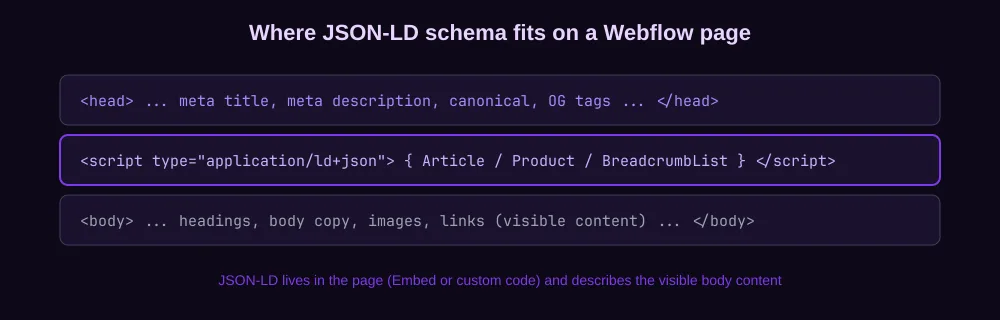
For example, for a blog you'd add Article or BlogPosting schema via an Embed on the blog post template, pulling the headline, date, and author from Collection fields. For a product catalog, you'd do the same with Product schema.
If you want this handled without writing JSON-LD by hand, Webflow lists a third-party app called Schema Flow that generates and publishes structured data inside Webflow. It's an integration, not a first-party feature.
Here is a minimal Article schema block you can paste into a Webflow Embed on a blog template, with CMS fields swapped in for the dynamic values:
{
  "@context": "https://schema.org",
  "@type": "Article",
  "headline": "Your post title",
  "datePublished": "2026-07-29",
  "dateModified": "2026-07-29",
  "author": {
    "@type": "Organization",
    "name": "Your Site"
  },
  "publisher": {
    "@type": "Organization",
    "name": "Your Site"
  },
  "mainEntityOfPage": {
    "@type": "WebPage",
    "@id": "https://example.com/blog/your-post"
  }
}
This matches the Article schema shape Google's documentation recommends for blog content, with a named author and publisher entity.
A note on what schema warrants in 2026: Google retired FAQ rich results across all sites in May 2026 and removed the corresponding documentation, so deploying FAQPage markup no longer secures a distinctive search appearance. Article, BreadcrumbList, Product, Review, Video, and Event remain rich-result-eligible when the visible content satisfies the requirements. Implementing schema for the eligible categories remains worthwhile, but it no longer functions as the lever it represented several years prior.
Core Web Vitals on Webflow
Core Web Vitals are Google's three speed and stability metrics that measure how a page actually feels to a user. They are part of Google's page experience signal. The company states the signal "aligns with what our core ranking systems seek to reward." The three metrics and their thresholds: LCP at 2.5 seconds or faster, INP under 200 milliseconds, and CLS under 0.1.
Webflow's hosting infrastructure contributes meaningfully here. Pages are delivered through Amazon CloudFront and Fastly from a global content distribution network, which maintains a low Time to First Byte and provides a structural advantage for LCP. The platform additionally manages image optimization, asset minification, and transfer compression automatically.
But the hosting infrastructure only carries you partway. Core Web Vitals failures on Webflow almost invariably originate in design decisions rather than platform constraints. Consider oversized hero videos, inadequately compressed imagery, excessive concurrent animations, and layout shifts from late-loading typography: these constitute the customary culprits, and Webflow will not prevent you from introducing any of them. INP complications, which superseded FID in 2024, typically emerge from JavaScript-intensive interactions and proliferating third-party scripts.
The fix is the same regardless of platform: compress your images, constrain animation density, and keep third-party scripts minimal. Webflow makes good CWV achievable; it doesn't make it automatic.
How Webflow AEO Works
Here's where the story gets genuinely interesting, and where it pays to read carefully.
In April 2026, Webflow introduced a product designated Webflow AEO (Answer Engine Optimization). It constitutes an agentic, closed-loop system for AI discovery that enables teams to measure their brand's visibility within AI-generated answers, receive prioritized recommendations, and deploy AI agents to implement corresponding improvements, all natively within Webflow. It launched in private beta for Enterprise customers and is progressively rolling out to the broader Enterprise customer base, with the agents consuming AI credits during operation.
Consequently, Webflow AEO functions as a measurement-and-execution layer for AI visibility: analytics illuminating where your brand appears in AI answers, recommendations identifying what warrants correction, and agents that operationalize those recommendations. It is not principally a schema generator or a content-restructuring instrument, and as of its launch it remains an Enterprise-tier capability.
What we've found: This is the tension worth understanding before you build an AI-search strategy around a tool. Webflow AEO is genuinely useful as a "how visible am I in ChatGPT and Perplexity?" dashboard for teams that need it. Current Webflow documentation lists Team or Enterprise Platform access, with an Analyze add-on for AEO analytics, and most of the underlying work — crawlable content, clear entities, source attribution, fast responses — is the same SEO you'd do anyway.
The practical content layer is covered in our guide to structuring Webflow pages for AEO and AI citations, which works whether or not your Workspace has access to Webflow AEO.
SEO vs AEO: What Actually Moves Rankings in 2026
The reason both concepts coexist is that search behavior has fundamentally bifurcated. Google continues ranking pages, but the zero-click phenomenon has become the predominant reality across the search results landscape.
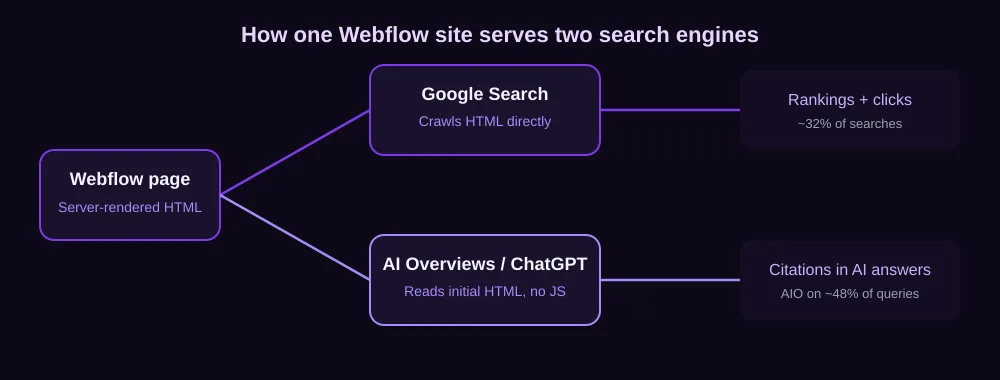
In the first four months of 2026, 68.01% of Google searches in the US ended without a click, up from 64.82% in 2024. Only about 276 of every 1,000 searches produced a click to the open web (SparkToro, June 2026). AI Overviews now appear on roughly 48% of tracked queries, and when one is present it typically pushes the first organic result below the fold (BrightEdge, February 2026).
Meanwhile, AI referral traffic remains modest but is expanding rapidly. AI platforms generated over 1.13 billion referral visits to the leading 1,000 websites within a single month, an increase of 357% year over year (Similarweb via TechCrunch, July 2025). That figure still constitutes a fraction of Google's approximately 191 billion, but the trajectory explains why "AEO" has emerged as a distinct budget allocation.
This constitutes the genuinely demanding analytical question: how much of "AEO" is actually substantively different from conventional SEO?
Google's own published response: comparatively little. The official AI optimization guide, updated July 2026, states explicitly that there is "no special schema.org markup you need to add" for generative AI search and that disproportionate concentration on structured data constitutes a misallocation. The supplementary AI features guide confirms there are "no additional requirements to appear in AI Overviews or AI Mode, nor other special optimizations necessary," as they draw from the identical index as conventional Search. Trade press has reasonably characterized Google's position as designating AEO and GEO as "still SEO" (Search Engine Journal).
So there are two defensible positions, both sourced:
- Google's position. Optimize for AI Overviews the same way you optimize for regular Search: helpful, original, well-structured content, fast responses, crawlable HTML, standard Article schema with author and publisher entities. No new schema, no chunking, no llms.txt required.
- The product/agency position. AI Overviews cite from a wide pool: only about 17% of AIO citations overlap with the page-one organic results (BrightEdge, 2026). Because the citation set reaches well beyond page one, measuring and actively improving your visibility across AI surfaces becomes a distinct discipline that benefits from dedicated tooling.
The synthesis that holds up under scrutiny: do the foundational SEO work that Google asks for, because that is also what makes you eligible for AI retrieval. Then, if you're an Enterprise team that needs to measure AI visibility at scale, a tool like Webflow AEO adds a measurement and execution layer on top. For everyone else, the foundational work is the whole job.
Verdict: For most teams, SEO and AEO are the same work. Dedicated AEO tooling adds value only when you need to measure AI visibility across many pages and have the budget for it.
Common Webflow SEO Mistakes
The platform is sound, but the most common SEO problems on Webflow sites come from how people build, not from Webflow itself.
- Forgetting dynamic meta tags on CMS templates. If your blog template has no dynamic meta description, every post inherits the default. Set up dynamic meta fields on every Collection template from day one.
- Skipping alt text. Webflow makes it easy to drop in images without describing them. Missing alt text is an accessibility failure first and an SEO failure second; add descriptive alt text to every meaningful image.
- Leaving default Open Graph images. A shared link with no OG image looks unfinished. Configure Open Graph settings so social shares render properly.
- Not setting up 301 redirects after redesigns. When you restructure a site, every old URL needs a 301 redirect or you leak link equity.
- Overlooking the 404 page. A good 404 page keeps lost visitors on site and helps Google understand your structure. Don't ship the default.
- Letting AI crawlers in (or out) without deciding. Webflow gives you site-wide robots.txt control. Decide deliberately whether GPTBot, ClaudeBot, and PerplexityBot may crawl. Blocking them cuts you off from AI retrieval entirely.
The fastest fix for any of these is the fundamentals. Our step-by-step guides walk through meta tags, canonical URLs, redirects, and sitemaps one task at a time.
The Webflow SEO Checklist
A practical, ordered checklist for a Webflow site. Tackle it top to bottom; the top items move rankings most.
- Set a unique, keyword-aligned meta title and description on every static page and CMS template
- Confirm canonical URLs are set (self-referencing is the default — verify it on key pages)
- Generate and submit the XML sitemap in Google Search Console
- Add JSON-LD
Articleschema to blog templates andProductschema where relevant - Add descriptive alt text to every image, and compress images for performance
- Configure Open Graph images so social shares look right
- Set up 301 redirects for any old or moved URLs
- Build a useful 404 page
- Audit Core Web Vitals in PageSpeed Insights and fix INP and LCP failures
- Decide your AI-crawler robots.txt policy deliberately
Frequently Asked Questions
Is Webflow good for SEO?
Yes. Webflow is well-suited to SEO because it serves pre-rendered static HTML to crawlers and includes built-in controls for meta tags, canonical URLs, 301 redirects, XML sitemaps, and Open Graph. Pages also host on a fast global CDN that supports good Core Web Vitals. Its CMS market share sits at about 1.2% (w3techs, 2026), reflecting steady adoption among design- and content-driven teams.
Does Webflow need an SEO plugin?
No. Webflow's SEO controls — meta titles, meta descriptions, canonical URLs, 301 redirects, sitemaps, and Open Graph — are built into the platform. There's nothing to install, update, or reconcile with other plugins. The one area that requires custom work is schema markup, which you add via custom code or the third-party Schema Flow app.
Is Webflow good for AI search and AEO?
For foundational AI visibility, yes — server-rendered HTML, crawlable content, and fast responses are exactly what AI retrieval systems benefit from, and those are Webflow's defaults. For dedicated AEO measurement and agent-driven optimization, Webflow offers a product called Webflow AEO, launched April 2026 for Enterprise customers. Note that Google's official guidance says no special schema or AI-specific optimization is required to appear in AI Overviews.
What is Webflow AEO?
Webflow AEO is an Enterprise-tier product launched April 2026. It's an agentic, closed-loop system that measures a brand's visibility in AI answers, surfaces prioritized recommendations, and uses AI agents to implement improvements. The agents consume AI credits. It is a measurement-and-execution layer for AI visibility, not a schema generator.
Does Webflow support schema markup?
Yes, but not through a native visual builder. You add JSON-LD schema either as custom code in page settings (for static schema) or via Embed elements (for schema generated dynamically from CMS fields). The third-party Schema Flow app handles JSON-LD generation inside Webflow if you prefer not to write markup by hand.
How does Webflow compare to Squarespace and Framer for SEO?
Webflow holds a meaningful SEO edge over both. Versus Framer, Webflow's server-rendered HTML beats Framer's client-side React rendering for indexing reliability on content-heavy sites. Versus Squarespace, Webflow gives you granular control over schema and canonical configuration that Squarespace automates but doesn't expose. See our full Webflow vs Framer and Webflow vs Squarespace comparisons.
Bottom Line
Webflow's SEO strength is real and it is mostly technical: server-rendered HTML, a clean control surface with no plugins to break, and fast CDN-hosted pages. The AEO conversation is more complicated than it looks. The platform's AEO product is a genuine Enterprise tool for measuring AI visibility, but Google's own guidance is that optimizing for AI search is conventional SEO: helpful content, crawlable HTML, standard schema, fast responses.
| Goal | What to do |
|---|---|
| Rank on Google | Nail the fundamentals: meta tags, canonicals, schema, CWV, helpful content |
| Get cited in AI Overviews | Do the same SEO work — Google says no special schema is required |
| Measure AI visibility at scale | Evaluate Webflow AEO if you're on Enterprise and need the dashboard |
| Avoid AI-search mistakes | Decide your robots.txt policy for AI crawlers deliberately |
For most teams, the highest-ROI work is the foundational SEO checklist above — that work makes you eligible for both Google rankings and AI citations. The dedicated AEO tooling is worth it only when you have the scale and budget to need measurement across many pages.
For more, explore our 70+ premium Webflow templates built with SEO best practices in mind — or get every template we make with the All Access Pass.


